DTMF and the FT-70D

I’ve been wanting to write up something covering what I discovered about my Zumspot and Yaesu FT-70D radio, especially how I configured them both, but there are already some excellent references online.  One website that has been very useful to me, is written by Toshen KE0FHS:  https://amateurradionotes.com/pi-star.htm

That link goes to his information of Pi-star, but be sure to check out the Hotspot section as well.

As for configuring the Zumspot, I highly suggest this document from David Hull, KC6N

It can take many hours of digging to figure out how to actually use the FT-70D with the YSF Rooms.  But the reality is pretty simple.  You need to place the radio into WIRES mode.  You do this by putting your radio into “DN” (Digital Narrow) by using the “MODE” button.  Then you enter WIRES by momentarily pushing the “F” button, then the “AMS” button.  You will see “WIRES” scrolling on the LCD, and with a bit of luck, a set of four rising tones will play indicating the 70D is in WIRES mode.  In my case, the first attempt seems to fail about 30% of the time, so I have to wait about 20 seconds for the radio to timeout so I can try again.

Once the radio is in WIRES mode, rotate the tuning knob one step CCW until the display shows “*—–“.  Simply key in the desired YSF room number, like 6 4 2 3 0 for Ragchew America, and press the “AMS” button (note: the PTT button is NOT used when setting up WIRES or picking a room number).   Your Zumspot should be connected to that room number, and the 70D will show “CONECT” then a scrolling “-RC     A”.

An excellent resource for YSF Rooms:  https://www.pistar.uk/ysf_reflectors.php

It should be possible to use DTMF tones to control the Zumspot without using WIRES.  However I have had ZERO success doing that, and have read many posts that indicate the DTMF digits don’t work correctly on the 70D.  Even the commands that are built-into the Zumspot, like powering down or resetting don’t work with 70D DTMF codes.  So I suspect there is something wrong with the radio itself.

There are another set of rooms, called “FCS” that would be very easy to get to using DTMF digits, if that worked.  Sadly it doesn’t.  The alternative way is to get access to them using WIRES.  But that is a problem as you don’t enter the room number directly, but instead have to subtract some sort of calculated offset (that might change over time), then enter that number.  It works but is VERY clunky.  Honestly it is easier to go into the Pi-star dashboard and reconfigure it.

Example FCS00285, DTMF A285, which happens to be “America Ragchew (XWIRES)” (a FCS room linked to YSF room 64230).  You would enter WIRES 0 0 1 3 8 to get there.  However if nobody else is in that room (or a repeater is not linked to it) that will fail to work.  Here in RI, FCS00239, DTMF A239, is the Rhode Island room.  It is accessed by WIRES 0 0 1 1 1.  The math isn’t consistent, probably because not every FCS room number is in use, and I suspect the offset changes when rooms are added or removed.  So mostly I stick to YSF rooms.

My final comment is that I have found my Zumspot will reset itself several times a day.  The good news is it always works.  The not so good news is it will change back to the default room assignment (in fact that’s how I know it is resetting).  No doubt this is the “PiStar-Watchdog” process discovering something wrong.

Posted in Digital Mode, DMR, FT-70D, FUSION, PiStar | 4 Comments

Yaesu System Fusion and ZumSpot Hotspot

My friend Pete, W1LAB, one of our DSTAR and Linux gurus, mentioned that he had become interested in a new HotSpot, the ZumSpot, that has become quite popular and is sold by HRO.  Part of the appeal was the rather low cost of the Yaesu FT-70D handheld radio (about 1/2 to 1/3 the cost of a DSTAR HT).  The FT-70D runs what is called Yaesu System Fusion (YSF).  There are not many repeater locally, but there is a robust set of YSF “Rooms” (think Reflectors) that folks can use.

I purchased a ZumSpot and the FT-70D, and set about learning how to use them.  It took about an hour to assemble the tiny case, transceiver, and Raspberry Pi Zero-W board.

I was fortunate that my ZumSpot arrived with fairly new software on the SD card which allowed it to setup a Auto AP (Access Point) because it couldn’t connect to my WiFi network yet (lacking knowledge of the SSID or Password).  By connecting my cell phone to the local AP (SSID Pistar-Setup).  The documentation didn’t spell out the password, but it is “raspberry”.  Once connected to the Auto AP, you could use the Configuration page to setup Pi-Star including the Wireless Configuration.  The only other “glitch” not documented was that I had to do a Power/Reboot command to reboot the RPi and get the WiFi Configuration Changes to take place.  From that point on, it was simply another node on my home WiFi network.

The ZumSpot supports DSTAR, YSF, NXDN, DMR, and P25 connections (only one active at a time), figuring out the mode your radio is in and switching to that digital mode for the HotSpot.  In addition the software supports bridging several modes together, so my FT-70D, in C4FM  mode, can connect to DMR, NXDN, and P25 nodes.

Posted in D-Star, DMR, FT-70D, FUSION, NXDN, P25, YSF | 21 Comments

NIST Director Copan Decides to Shut Down WWV/WWVB/WWVH

Can you believe that WWV, WWVB and WWVH will be shut down in 2019?  Struck me as beyond strange, but sure enough it shows up in the 2019 budget request:

  • -$6.3 million supporting fundamental measurement dissemination, including the shutdown of NIST radio stations in Colorado and Hawaii

https://www.nist.gov/director/fy-2019-presidential-budget-request-summary/fundamental-measurement-quantum-science-and

I suggest owners of “Atomic” watches and clocks write frequently and often to protest this decision that is supported by Walter Copan, the current Director NIST.

Arrl news here: http://www.arrl.org/news/nist-fy-2019-budget-would-eliminate-wwv-and-wwvh

Posted in From the OM | 7 Comments

Tried WSJT-X in Hound Mode for the first time

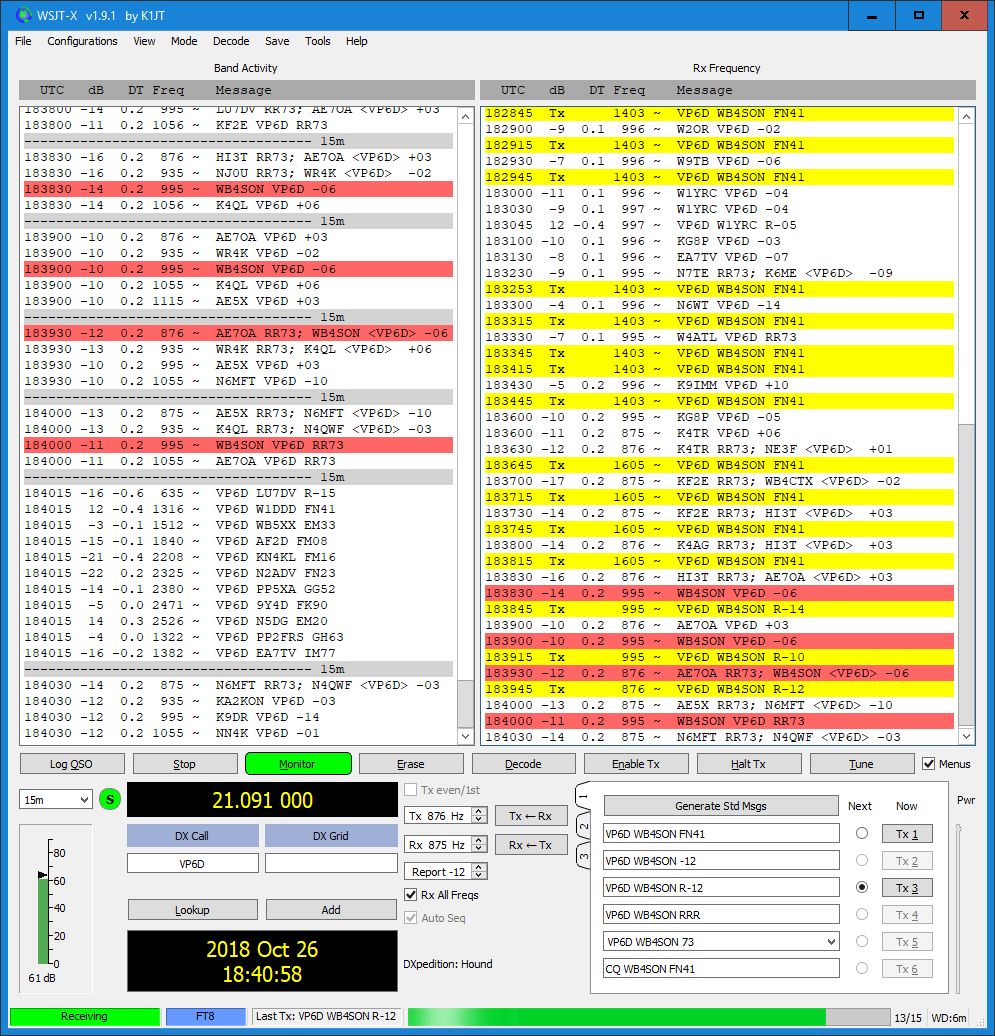
Today I heard SO1WS in Western Sahara on 17-meters.  I noticed a very raspy FT-8 signal, and after checking the time offset, it turned out to be So1WS — however upon further review it was apparent that they were running the the “Fox” mode as they were having multiple contacts each transmit cycle.  So I changed over to the “Hound” mode and gave them a call.  Sure enough after a few cycles they came back.  I noticed that my station never sent 73, but when they sent RR73 the “Log Contact” box popped up.  Sounds like a good contact.

Interesting.  Time to read the manual.

Note that “RX All Freqs” is checked. Also I’ve checked “Hound” mode under File/Settings/Advanced.

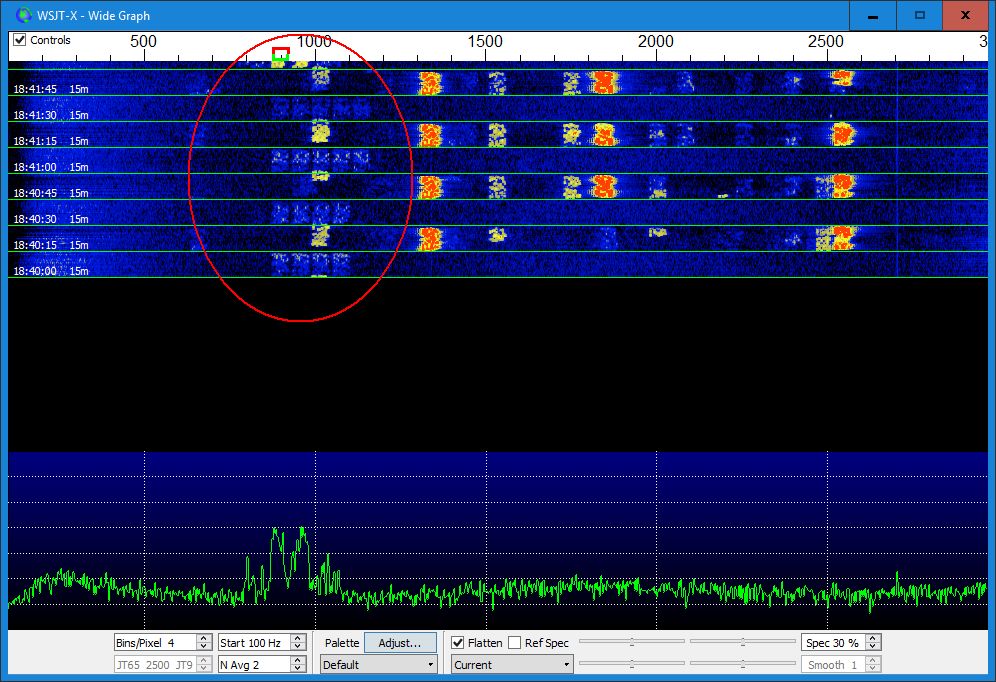
Note that I started sending at 1751, but I was switched down to 1509 automatically when the contact occurred.  That was the frequency SO1WS was sending to me.  Note another station was being communicated with on 1569 at the same time.

Posted in From the OM, FT8 | Leave a comment

Six Meters IS the Magic Band

If one were to take a look at the WSJT-X screen cap below, perhaps it wouldn’t seem too unusual.  Operating 6 meters, a few signals on.  It shows I was calling CQ around 141715 UTC, and was answered by N7BD.  I was surprised at the signal disparity (He a +1 dB, me a -22 dB).

The punch line to this joke was that I happened to be attached to my DUMMY LOAD via the antenna switch in my KAT500.  Now I will admit that the isolation on that switch is pretty bad (Unusual for Elecraft), but seriously, I hear several stations and make a contact on 6-meters via dummy load!?!

Obviously when I switched to my actual antenna signals went up considerably, and now I’m heard up and down the east coast.

PS: A good friend commented that this is typical of ALL ham gear — lousy isolation in antenna switches.  I measured the isolation today:  at 50 MHz it is only 30 dB (very poor).  On 3.5 MHz it improves to 60 dB.  But my 25 watt signal would have been down to 25 milliwatts with only 30 dB of isolation — clearly still a FT8 signal.

Posted in 6-Meters | 3 Comments

Someone Trying To Tell Me Something?

My Inverted L antenna begins its journey skyward at the base of an old oak tree.  A 600 watt remote tuner is installed there, along with multiple radials into the woods and yard.  The “L” wire comes down from a tree branch overhead and attaches to the Antenna port of the tuner.

Like many “ham” things that tuner isn’t the most robust design.  While I use this with a barefoot K3s, and follow the warning to never tune with more than 20 watts, the tuner has an annoying “Auto Tune” feature that starts the tuning process above some internal SWR setting.  With a wire antenna in the trees, sometimes strange things happen to the SWR as the antenna moves around.  In fact, one day on 75 meters that happened while I was transmitting, and the tuner went into Auto Tune.  That was all it took to burn something out — the tuner was never the same.  It stayed out of service for the past couple of months until my daughter and I replaced the tuner.  So bad luck item #1.

About 10 days ago, my shack PC caught on fire.  I chronicled that, and was back on the air a few days ago.  Bad luck item #2

This past Friday/Saturday, we had a bad coastal storm.  It blew a branch down that fell between the oak tree and the tuner.  The tuner survived, but the antenna attachment broke off as you can see in the photo below.  It was easy to reattach the antenna wire.  That was bad luck item #3.

So either bad luck travels in threes as they say, or someone is trying to tell me to keep off the air.  I hope it’s the former.


Posted in Antennas, Computers, Operating | Leave a comment

Nice Day at RI ARES Beavertail Picnic

My thanks to Paul N1PSX, our RI SEC (Section Emergency Coordinator), and the ARES team for a nice time this Saturday at their annual picnic/get-together.  There were lots of folks from each corner of the state, most of them bringing hundreds of pounds of radio gear to deploy for a few hours today at beautiful Beavertail State Park.

I brought my 100 watt solar panel/charge controller/60AH LiFePO4 battery, and used it to run my IC-7000 to a 20-meter HF Stick mounted on the roof of my truck.  The intent was to show off solar operation, but two other stations were on the air using solar panels by the time I arrived.

There were some impressive antennas in use, lots of tall poles, and even a truck with a 25 foot tower.  However, my tiny rooftop ham stick worked fine and I was able to make a half dozen contacts.  One young visitor, Jack (entering 4th grade this fall), asked if he could make a contact, and started calling CQ.  It took him a bit to raise someone, but my thanks to Dave, N8MME, who came back to him from SE Michigan.

It was a beautiful day to be at the Beavertail Lighthouse on Conanicut Island (US0156, NA031, RI0007S).

Photo by Bob Rico (https://www.youtube.com/watch?v=AWD7xdjlle8)

Posted in ILLW, IOTA, Operating, Portable, USIslands | Leave a comment

Musings on PC Clock Accuracy

As a digital mode and satellite operator, accurate time is essential.  The internet is a wonderful step forward in that Network Time Protocol (NTP) services give the potential for every PC to be accurate to within milliseconds.  Windows recognizes this and has a service called W32tm that deals with clock settings using NTP.  Unfortunately most of the interesting settings are buried in the registry, such as the polling interval which is set to check the time about every 9 hours.  Also the default NTP servers often do not work (for me at least), and I’ve found the pool.ntp.org servers to be far more robust.   There is a nice post that describes these details at Windows Central.

There are several very sophisticated time services such as Dimension4 or Meinberg that can be installed on a PC.  The installation and configuration is non-trivial, however.  And of course that is “one more thing” to worry about in terms of security.  Personally I’ve found it far easier to add the pool.ntp.org servers and change the HKEY_LOCAL_MACHINE\SYSTEM\ControlSet\Services\W32Time\TimeProviders\NtpClient   SpecialPollInterval  Registry key entry to something more like an hour (3600 seconds).

This time (no pun intended) that didn’t work for me.  Every time my new shack PC boots up, it dutifully uses NTP services and manages to set the PC clock to a value that is consistently 0.4 seconds behind.  I suspect during the boot process, some higher priority task is managing to interfere between obtaining the correct time, and setting the PC hardware clock.  To make matters worse, manually requesting windows to adjust the time automatically doesn’t work either.

There are two work-arounds.  The first is simply waiting for an hour (the SpecialPollInterval).  At that time windows will synch up and remain accurate, never being off more that a few milliseconds.  The second is to turn off automatic time adjustment, adjust the clock by a minute or two manually, then turn automatic time adjustment back on.  I’m guessing that windows has some sort of feature that prevents it from constantly messing with the clock until some threshold difference between NTP time and PC Hardware Clock time has been reached.

Posted in Computers, NTP, Time | 1 Comment

Shack PC Up and Running

After the fire last Sunday, I did some testing, and found a good hunk of my 10-year old PC was gone.  The cost to repair was going to be significant, and I’d be left with the guts of an old PC.  I decided to replace the PC with a business-class small form factor machine.  Much faster CPU, more RAM, a faster SSD, and much smaller/quieter is the good news.  Bad news is that any new PC requires lots of software updates and configuration.

Yesterday I spent about four hours to get the PC up and running with all the required updates and drivers.  This morning I started working on the ham applications; HRD, tQSL, WSJT-X, and JTAlert.  About four hours later I had my first FT-8 QSO in the log book and uploaded to LotW.

Now I need to get all my tools loaded for Frequency Measurement Tests, and a few other ham related toys.

Posted in Computers, LotW, WSJT-X | Leave a comment

“Emergency! There is smoke in the basement”

So I have a rule about keeping all my WB4SON Blog comments about radio.  Keeps me on topic and away from controversial subjects, which is a good thing.  In the very sad news department, my constant companion Lily, our 14-year old English Springer Spaniel, departed the world just before noon today.  I wanted to write something about her, as I was thinking of the number of cold nights she would be curled up warming my feet as I sat in front of my radio in the basement.  But it just didn’t seem right.  So I had no plan to write anything.

About 10 weeks ago, I had developed a minor medical issue that made it quite difficult to get up/down the basement stairs, and in mid June we became aware that Lily was terminally ill.  These things pretty much kept me off the air.  After an unbelievably fantastic final month (lots of walks, trips to her favorite places, huge quantities of bacon, etc.)  Lily let us know yesterday that it was her time, and we made arrangements for her this morning.

After returning from the Vet, a friend contacted me to help him check out his new antenna, so I turned on my radio gear and verified his antenna was working.  But, as was my practice, I left the radio and computer on, figuring I would come downstairs later today — a distraction from missing Lily.

At about 3:15 today, our Nest Smoke Alarms blared into alert: “Emergency, emergency, there is smoke in the basement”.  Knowing the radio was on, I had my daughter grab the fire extinguisher, and we headed downstairs (after being sure there wasn’t a blazing fire at the bottom of the steps).  The smell of burning electronics was quite strong, and as we entered the radio room, we could see a column of thick, black smoke rising from the top mounted PC fan — the computer was literally on fire.  I snatched cables off it, and we could see flames shooting out the back of the DVD burner, which was at the top of the tower.  After getting the computer outside, I pulled the DVD burner out, and eventually the flame died out.  With the exception of that drive and some cables that were burned by the flame, the rest of the computer may well be OK — time will tell.

I can only think that our dog Lily wanted to be sure that I wasn’t distracted by my radio and would be thinking of nothing but her today.  So it goes.

Flames were shooting out the back of this BlueRay writer. Note all the burned plastic. Drive was not in use at the time.

Posted in Computers, From the OM | 2 Comments