A Grand Day at ARRL HQ

A friend of mine, Paul, N1PSX, and I drove to ARRL HQ yesterday for a visit.  It was Paul’s first trip, and the first time in a long time for me (my father and I visited in 1982 when we took our Extra exams).

ARRL Welcome Sign for Paul and Bob

ARRL Welcome Sign for Paul and Bob

Jon, KC1ECT was our tour guide and it took us about 3 hours to visit many departments and see the W1AW station.  I had a chance to chat with Debra Johnson, the Education Services Manager, about our outreach activities in RI.  And very nice folks helped Paul and me check in QSL cards for DXCC and WAS (A special Thank You to Sharon and Gloria).

There were lots of historical items on display and wonderful stories about gear that was designed for publication purposes (Tuna Can II).  There were several HW-16s stashed in various offices, lots of other Heathkit gear and Collins gear, but something that caught my attention was a Central Electronics 20A — my first SSB radio transmitter.

Central Electronics 20A 2

Central Electronics 20A SSB Transmitter (20 watts out)

A surprisingly emotional experience was seeing my father’s memorial brick in the Diamond Terrace (one of several I’ve had placed over the years).  I had only seen it in my mind’s eye before.  Seeing it in the terrace brought back a flood of memories about weekly QSOs and I could hear his voice again — He’s been gone so long and I miss him so.

Memorial Brick for my father, KC2ON/WA4SAU at ARRL HQ

Memorial Brick for my father, KC2ON/WA4SAU at ARRL HQ

Everyone at ARRL HQ was extremely outgoing and helpful.  What a great group of people working on our behalf — making radio fun for us day in and day out.  Paul and I are planning to return for a full day of W1AW operation.


Posted in From the OM, Gear, History | Leave a comment

VK0EK Heard Island Success on 80-meters

Propagation and fate smiled on me.  Shortly after I could hear VK0EK’s 80 meter signal at about S-3 (local noise level S-2), I was able to work them a few minutes before local sunset.  Grey line propagation with a bit of a boost due to the coastal cold front perhaps. My hats off to the guys on Heard Island — they are working the magic on their end.

DX Atlas Showing a Successful 80-m QSO with VK0EK

DX Atlas Showing a Successful 80-m QSO with VK0EK

Posted in DX | Leave a comment

ISS-Above on 7″ LCD

I finally had a chance to tie the Raspberry Pi Foundation 7″ LCD/Touchscreen onto a RPi 2 running the ISS-Above firmware.  The results were outstanding.  It makes for a nice desk piece, with only a single power supply wire exiting the back (when using WiFi).  All the screens that would show up on the HDMI display, show up on the LCD instead and they look quite nice.

WB4SONissAbove

Posted in ARISS, Raspberry Pi, Satellite | Leave a comment

ISS-Above: Coolest Tool for ISS Pass Prediction – EVER

While looking for interesting things to display concerning the ISS during our upcoming ARISS contact, I stumbled across a now commercial product that started not long ago as an overfunded Kickstarter campaign. ISS-Above.

ISS-Above is a Raspberry Pi based product with different output configurations that indicate when the next International Space Station pass will happen.  The output can be attractive screens showing via a HDMI connector, various LCD modules, or simply colored blinking lights.  HDMI users have an additional feature — live streaming video feed from the Space Station (the HDEV: High Definition Earth-Viewing experiment).

While complete units can be purchased for about $150, RPi enthusiasts can use their own hardware by purchasing a SD Card image for $30.

I did the latter yesterday at about 2 PM, stuffed the SD card into a RPi Model B+ that I had hanging around with an Adafruit 16×2 LCD, and DLINK USB WiFi Dongle.  By 2:30 PM I was up and running (most of that time was spent copying the OS image to the SD card).

I am completely blown away by what Liam has done with ISS-Above.  My daughter and I sat transfixed in front of the TV watching the live video stream until the ISS went into darkness.  I’ll be buying another license and putting together more hardware for use at All Saints Academy during on ARISS Contact Day in May

ISSAbove


Posted in ARISS, Raspberry Pi, Satellite | Leave a comment

Getting the RPi 3 to work with Bluetooth

After solving the display rotation issue, I was anxious to get rid of the USB based keyboard and mouse, and move onto Bluetooth based devices.  I had followed a RPi blog instruction to update various parts of the OS, and install a GUI-based tool called Bluez to manage the process. Unfortunately that was HORRIBLE advice.  Bluez is NOT stable at the moment and prevented every Bluetooth keyboard/mouse I had from pairing.  Even trying to remove Bluez turned into a nightmare, so I decided to start from scratch with a new NOOBS image.

The latest NOOBS (1.9) has support for the LCD, Bluetooth, and WiFi support built-in.  No changes were necessary to get it to support the LCD display, so it was possible to boot right into the GUI and setup the WiFi from there.  The line “lcd_rotate=2” still needs to be added to \boot\config.txt to rotate the LCD to work with cases that are currently shipping (IMPORTANT NOTE:  display_rotate=2 will NOT correct the touchscreen — use lcd_rotate=2 for things to work properly).

To setup Bluetooth without the aid of a GUI, one needs open a terminal session and type “bluetoothctl”.  That will open the configuration utility. When I did this, I had to enter the “power on” and “agent on” commands, followed by “scan on” to discover my keyboard (a 1byone keyboard with touchpad that can be found for $24 on Amazon).

After turning the keyboard on, and pressing the <FN><C> keys to start the keyboard discovery process running, the 1byone device showed up in the bluetoothctl tool, revealing its MAC address.  Jot that address down and do the following:

Enter “pair xx:xx:xx:xx:xx:xx” to pair the device.  This will popup a passcode, which must be typed on the keyboard (followed by the <Enter> key).  You should see a report indicating a successful pair.  If you don’t try things again (I had to do it twice, might have mistyped the passcode for all I know).

After the device pairs, enter the “trust xx:xx:xx:xx:xx:xx” command.  That enters that MAC address into a trusted list for future connections.

In theory after trusting the device, a “connect xx:xx:xx:xx:xx:xx” command might be needed, but mine remained connected after trusting.

Exit the bluetoothctl  configuration utility and enjoy the wireless keyboard and mouse!

Note:  you will need to cycle power on the keyboard every time you reboot the RPi, otherwise the keyboard and trackpad don’t seem to reconnect with the RPi.

BlueWorking

As a FYI, I found that my RPi 3 pulls 670 mA from a 5.1 power supply when running Bluetooth, WiFi and the LCD.  Also, a 8GB microSD will have about 2.4 GB left.

Posted in Projects, Raspberry Pi | Leave a comment

Quest for 250 Confirmations Completed

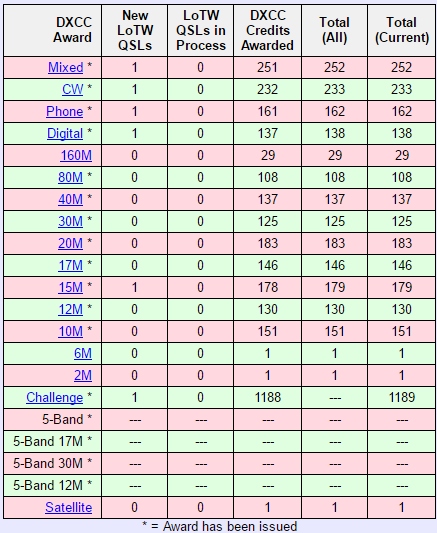
With the arrival of a LotW confirmation from 3C7A (Equatorial Guinea), my LotW count reached 246.  I have 4 QSLs in hand from S01WS (Western Sahara), E40VB (Palestine), DV1UD (Philippines), and XW3DT (Laos).  That will put me at the 250 mark and the next DXCC endorsement.  I’m making plans to travel to the ARRL to have the cards checked into the system soon.

WB4SON DXCC

That will also bring my DXCC Challenge to 1184, and add the final confirmation required for Hawaii to complete 30-meter WAS.

Posted in DX, Operating | 4 Comments

Fixing an Upside-Down RPi3 7″ LCD Display

The Raspberry Pi Foundation announced their new RPi Model 3 this month, upping the processor speed and memory yet again.  They also announced the availability of an “official” 7″ LCD with touchscreen.

I couldn’t resist picking up one of each to try things out.  I also purchased a cleaver Plexiglas cast/stand for the LCD made by Pimo Roni (sold by Adafruit as their P2033 case).

Imagine my surprise, when I put things together and found out the display was upside down — it wasn’t an assembly error, the display was different.  When I checked the RPi Foundation website, their online video clearly showed that the display and case were mounted properly.

It turns out that they discovered they had not selected the correct orientation of the display in their initial samples.

It’s pretty easy to add “lcd_rotate=2” to the \boot\config.txt file and correct things, but it is also clear that the LCD viewing angle is better with the display as shipped.  The foundation is working on the problem which also puts some cable openings in less than desired locations.  They are suggesting that users wait for case vendors to change things around. (IMPORTANT NOTE:  display_rotate=2 will NOT correct the touchscreen — use lcd_rotate=2 for things to work properly).

Meanwhile, thing work good enough with the lcd_rotate=2 command, and the touchscreen/LCD make for a nice small package.

P3 Display Front

P3 Display Rear

For ISS-Above users, the …/boot/config.txt settings can be reached through the built-in web server.  Simply enter the dotted address of your ISS-Above with “/admin” as shown below.  Then click on the “Configure HDMI Settings” highlight to open an editor.  scroll to the bottom of the file and add the “lcd_rotate=2” setting.  Save it, then click on the “Power off/reboot” tab to reboot the machine and have the invert setting take effect as it boots up.


Posted in ISS, Raspberry Pi | Leave a comment

A Small Step Forward for 12-m WAS

While the DXCC counts continue to creep up slowly, my WAS activity has been stuck in the mud needing Hawaii on 30m, plus Delaware and West Virginia on 12m.  Yesterday, I stumbled across Glenn, W3WTE, on 12m, and received confirmation today.

I have a QSL card from a Hawaiian QSO on 30m waiting to be checked by a DXCC Field Checker.  So in theory 30m is complete as well (if that links into the WAS account).  Now I’m just a West Virginia 12m QSO away from 8BWAS.


Posted in Operating | Leave a comment

DXCC Results for Feb 2016

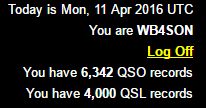
The march continues slowly.  As of Feb 29, 2016 (Happy Leap Year), 244 countries have been confirmed in LotW, with another 4 QSL cards in hand, making a total of 248.  In terms of band-point for the Challenge, 1150 are in LotW, plus another 22 in QSL form, for a total of 1172.

WB4SON DXCC Feb 29

Obtaining 250 should happen in the next few months.  Although I’ve worked Guinea several times in the past, it has never been confirmed.  The Italian DXPedition Team has been operating as 3XY1T for a month now, and I’m in their log on seven bands so far. They are always great with QSL and LotW confirmations.  So that’s one more I can count on. Perhaps Heard Island, if I am lucky enough to work them, will become #250.

Posted in DX, Operating | Leave a comment

Sunrise/Sunset for Grey-line DX

Besides being a true fan of sunshine, I want to wish my way through the dark days of winter by focusing on the fact that there are more hours of daylight each day now.  With the decline in solar activity as we slide down the downward slope of the cycle, gray-line propagation becomes more important.

Here is a graph of sunrise/sunset/hours of sunlight for this year.  The discontinuity occurs when we change from Standard Time to Saving Time on the 2nd Sunday in March, and back on the 1st Sunday in November.

SunriseSunsetNK1

Sunrise in YELLOW, Sunset in RED, and total hours of sunlight in BLUE

Posted in DX | Leave a comment