I really went deep into a rabbit hole yesterday. I had been reading and listing to many things POTA related and stumbled upon the fact that there was now a DMR Talkgroup, 3181, for POTA users to coordinate their activations. Probably been there for years, but it was new for me.
That turned into a day-consuming rat hole for me as it meant that I had to reprogram my Alinco DJ-MD5 HTs with the new talk group. Anyone who has ever used DMR will immediately recognize that is not a “push a few buttons” task. In my case it was made worse by the fact that I hadn’t changed the codeplug in my HTs in 7 years. In other words, I had to relearn everything about my radios and their configuration software before I could reprogram them.
My “Drink Me” moment began when I discovered that my DJ-MD5 had been obsoleted about six years ago. Thus my journey started with trying to locate the programming software. Oddly enough, the radio never appeared on the Alinco site, so that was no good. I did order them from DXengineering, but they really didn’t have a link to the firmware and programming software. HOWEVER, buried in their archive was this link:
https://www.remtronix.com/digital-radio/discontinued/dj-md5tgp/
Sure enough that had several versions of the programming software as well as firmware versions – which was good because my original radio had version 1.02 firmware and the most recent one had version 1.13C.
I downloaded the CPS 1.12 programming software, which was distributed with the version 1.13C firmware. In installed flawlessly. But when I plugged the radio into my PC, Device Manger didn’t find it. Then I had a vague memory that the micro USB connector on the side of the radio was amazingly hard to plug in. Sure enough, after an obscenely hard push, the connector snicked into place, and Device Manager discovered it as a new COM port.
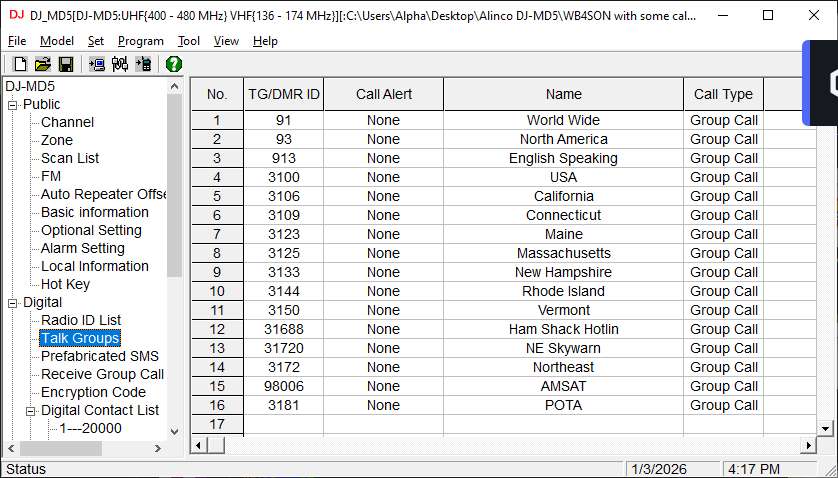
Using the CPS software I was able to suck the contents out of both of my radios (FW 1.13C and FW 1.02). Now the second part of the journey was to rediscover how to set things up in a DMR radio. Fortunately I had several other talkgroups defined, so I was able to copy/paste one and change it to the POTA Talkgroup 3181.
The above sounds easy, but as any DMR user knows, that’s the view from 40,000 feet. In reality I had to add the new talk group in (under the Digital/Talk Groups) tab first.
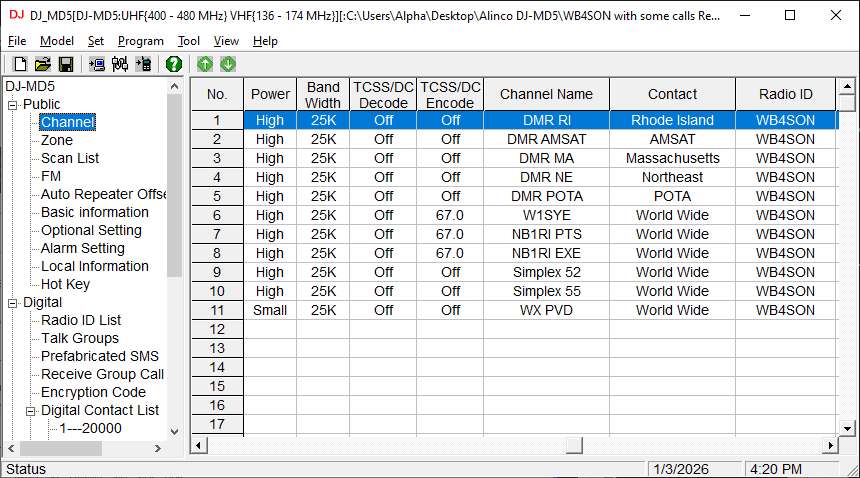
Next I had to edit the Public/Channel tab to add in a new channel for POTA:
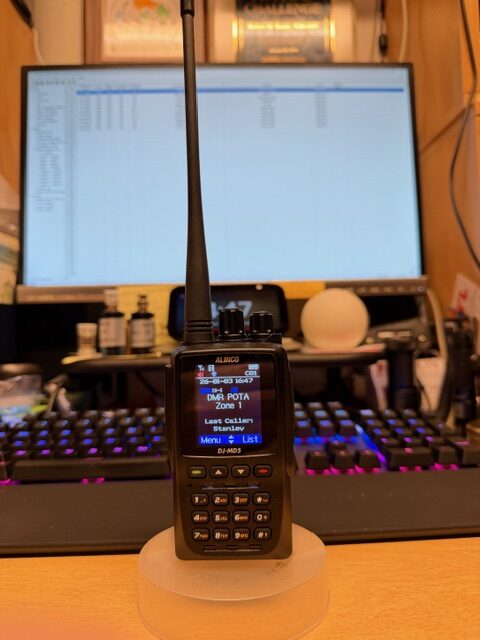
Finally the Public/Zone tab had to be activated to add the new channels into Zone 1 (I only use one Zone in my radio, but there are many cases where multiple zones would be helpful in organizing things). See the photo below:
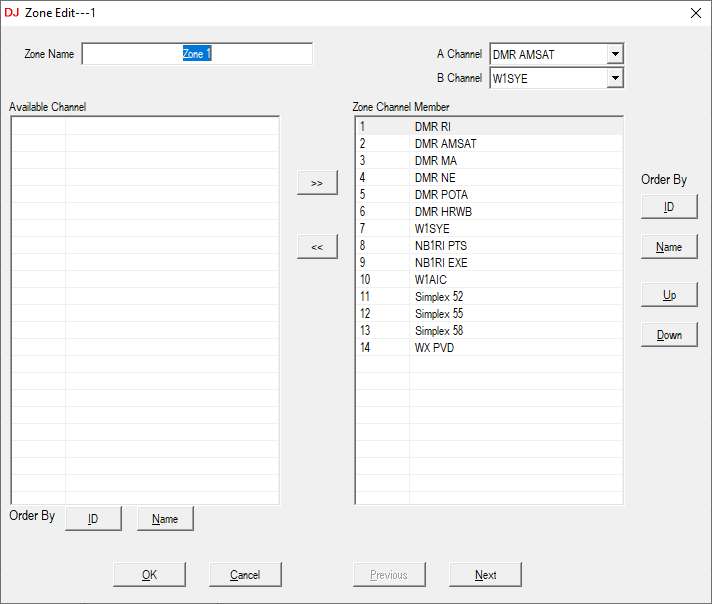
Those three steps are the magic that was needed to get the POTA talk group into my radios. But I still had two remaining issues: Firmware out of date in one of the radios, and adding the Digital Contact List to both radios (last updated in 2019).
I figured I could take the 1.13C firmware I had downloaded and use the Tool/Firmware Update to upload it to my radio. Simple, Right? Wrong! First you need the magic decoder ring to get your radio into the firmware update mode. That’s in the PDF I have here:
Then pay careful attention to the bottom of the third page which explains that you need to run the CPS software IN ADMINISTATOR MODE, otherwise you will get a “Run Time Error 5”. Funny that is the FIRST thing you need to know before you start the software, rather than the last thing you read in the instruction!
It is almost time for the “Eat Me” return to real life. The remaining item was to update the Digital Contact List (the DMR User ID information). That required a trip to the Radio ID database, and obtaining the latest USERS.CSV file from there:
https://radioid.net/database/dumps
The trouble is that file is HUGE – it has all the DMR IDs. I used Excel to delete everything but the US and Canadian IDs. Even that was pretty large, 153,387 users as of yesterday. But it was small enough to fit inside the DJ-MD5, which has room for 200,000 users.
So after that journey to Wonderland, and several rabbit (or rat) hole detours I was rewarded with a POTA Talkgroup on my DJ-MD5.


The world of DMR has certainly evolved recently with the development of PC and smartphone apps capable of (reasonably) easy setup and connection to the various digital voice networks out there including DMR. Has this POTA-specific talkgroup (3181) been active at all? There is a weekly POTA net at the KC Wide talk group (BM 313136) that meets Mondays 2300 UT (during DST) / Tuesdays 0000 UT (during standard time).
Hi Richard,
Even with PC tools, I find DMR to be incredibly complex. Once you have it set up correctly, it works just fine, but it has a long learning curve.
I haven’t notice much activity on the POTA talkgroup. I noticed more earlier this year. Honestly DMR seems pretty unlikely to be usable for someone doing an activation (Odds of a cell tower is reasonable, odds of an analog repeater is fair, odds of a DMR repeater is non-existent). Perhaps for some of the RV Rovers with good internet connections?
Thanks for the info on the KC Wide Talk Group (BM 313136). I will give that a try!!
73, Bob, WB4SON