NM22 Log Uploaded to LotW

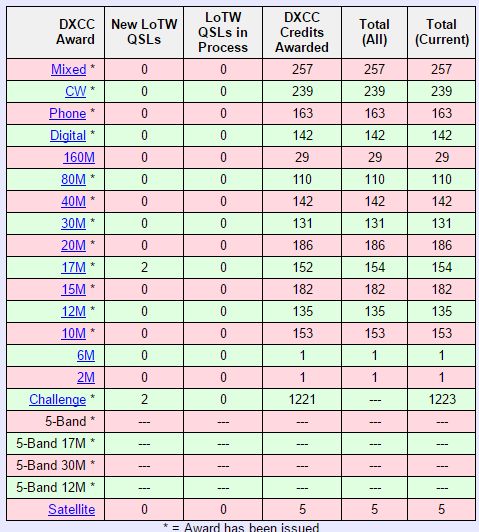
Finally typed up the 110 QSOs for yesterday’s activation of NM22 and uploaded them to LotW around 2100 UTC today.  53 of them instantly matched, so I guess most of the park hunters are quick to upload their logs.

Posted in NPOTA | Leave a comment

NM22 NPOTA Activation Success

Emboldened by my success at the local beach running 20-meter SSB from my truck, I figured that I would give a NPOTA Activation a try.  So last night I registered a two hour long activation of NM22, Roger Williams National Memorial Park, starting at 17:00 UTC today.

RI is a small state to begin with, and there aren’t as many opportunities for NPOTA Activations as in other areas, but at least with the exception of Touro, they are easy to activate and close-by.  Some checking indicated that NM22 had been activated 13 times before with about 1,170 QSOs total, so I knew there would be folks looking for it.

screen-shot-2016-11-13-at-3-37-54-pm

nm22sign

I pulled into the park at about 16:45 UTC, and found a parking spot away from trees and other things that might detune my antenna.

nm22truck

I was on the air around 14.265 MHz by 16:56 UTC and continued to work stations until 19:13 UTC.  After 140 on-air minutes I had worked 110 stations, in 35 different states (oddly enough zero DX).  The band conditions were not great.  At times you could literally hear the bottom of the band drop out, but 3-5 minutes later signals would be back.  So there was lots of QSB and QRM to deal with.

Conditions were actually a bit better than yesterday.

nm22-solar

And it was a good thing I mostly spotted myself, but there were several other nice Ops who spotted me as well:

nm22-spots

Posted in NPOTA, Operating, Portable | Leave a comment

Success on 20-Meter Mobile

During JOTA 2016, my HF station had some RF issues due to the use of an off-center-fed-dipole (OCFD).  This type of antenna almost always has common-mode current issues on the coax.  Ultimately we solved it by making a 5 inch diameter coil of coax, about 8 turns. But prior to “fixing” the issue, Pete, W1LAB, pulled up his SUV and allowed us to use his Hustler 20m vertical.  It worked surprisingly well — what we were hearing on the 135 foot long OCFD, 40 feet up in the air, was coming in the same S-level or better on a 4 foot tall vertcial antenna.  Given those results I figured I needed to give things a try someday.

With my wife at work today and some spare time on my hands, I headed over to Compass Rose Beach and popped a 20-meter vertical on the roof of my truck using a 5-inch Hustler Mag-Mount.  I did a bit of tweaking with my antenna analyzer and finally had about 3.5 inches of the whip sticking below it’s ferrule mount (the manual suggested 4″, which probably would have been spot-on).

This antenna produced the following SWR distribution:

14.000  1.5:1
14.100  1.0:1
14.200  1.2:1
14.300  1.5:1
14.350  1.8:1

Because this was just a quick experiment, I had chosen a MFJ 1620T over the Hustler due to lower cost ($15 vs about $65) and extended length used on the roof mount (7′ vs 4′). The single 5″  Mag-Mount is strictly a stationary mount — it would never hold the 7′ long antenna even at slow mobile speeds.  I also had some RF feedback issues that were fixed by putting a 10-turn 5″ coil of coax right at the radio end.

I spent a hour on the air and worked seven stations in Spain, Saint Lucia, Bonaire, TN, FL, IL, and MN.  The antenna performed well to the South as expected, as well as to Europe.

truckstick

MFJ 1620T Vertical antenna on Hustler MBM mount – Jamestown RI dead ahead

truck7000

Icom IC-7000 operating 20-m SSB. Powered by 30AH LiFePO4 Battery

Band conditions were just "Fair" on 20m today.

Band conditions were just “Fair” on 20-m today.

Posted in Operating, Portable | 2 Comments

Amazed at 400th Anniversary of Cervantes Radio Event

I am absolutely blown away by what the URE (Union Radioaficionados Espanoles – their equivalent of the ARRL) – put together to celebrate the 400th anniversary of the death of Miguel de Cervantes.  The event last for only THREE WEEKS, starting September 19th and containing through October 9th.

Spanish hams have been operating under 14 different callsigns, racking up over 660,000 contacts as of today.  That’s a rate of about 50,000 QSOs per day on all bands from 160-m to 10-m; operating SSB, CW and various digital modes.

cervantes1

They have various “print your own” certificates for various achievement levels.  For example, the “Gold” certificate for contacting at least 6 different stations on each of 3 different bands looks like this:

cervantes2

Lots of effort and planning clearly went into this, their webpage provides an online log, automatic score keeping and production of certificates.  A store gives people options of purchasing printed certificates or buying mementos.  Other tools identify AN400x stations that are currently on the air, global rankings, statistics, and team challenge information.

Imagine a DXpedition that had 650,000+ contacts.  Now imagine that DXpedition being to Spain!  Yet that is EXACTLY what happened.  Spain has over 60,000 hams, and over 12,000 of them belong to the URE.  What they have accomplished is nothing short of remarkable. Hat’s off to the members of the URE that made this fun event available worldwide. They have provided a template of a successful radio event that could be emulated by many different groups.

Posted in Contests, DX, Operating | Leave a comment

Touch-Tone Control of DVmega Hotspot

The DVmega, running ircDBGateway software, supports control/linking via DTMF Touch-Tone commands (that is an option that can be turned off, but it defaults to on).  This is generally much easier to do than struggling with trying to reprogram the UR field to accomplish the desired task.

To use the DTMF commands, it is essential that the UR field be set to CQCQCQ, the RPT1 field be set to “WB4SON C”and the RPT2 field be set to “WB4SON G”.  Also, as always it is critical that the Hotspot be accessed with Duplex + or – and an offset of 0 (failure to do that prevents the digital audio from being decoded by the Hotspot).

DTMF # –> Is the Unlink Command

DTMF 0 –> The Check Status Command (responds “unlinked” or “linked to …”)

DTMF ** –> This will set the Hotspot to the default gateway (REF069C in my case)

DTMF A –> Disconnects CCS call routing

To link to a reflector, use the following DTMF commands. By trial and error, I’ve found that you must hold the PTT button for a second or so after you finish sending any tones — makes sense, usual DSTAR propagation delays.

DTMF *50C –> Links to REF050C

DTMF *69C –> Links to REF069C

DTMF B12A –> Links to XRF012A

DTMF B21B –> Links to XRF021B

My TouchTone keypad does NOT include the “D” character so I haven’t tested the DCS Reflectors

To do callsign routing, simply enter the 7 digit code

DTMF 3109071 –> Fran, W1FJM

DTMF 3144032 –> Bob, WB4SON

Send a DTMF “A” to disconnect when done


Posted in D-Star | Leave a comment

The Easiest DSTAR I’ve Ever Used

I’ve laid hands on six different Icom DSTAR radios, included the latest/greatest, and they all suffer from horrible illogical human interface designs.  Perhaps it is simply a cultural thing — what the Japanese find easy to do, frustrates someone from North America, but you would think they would get a clue.

I had the exact opposite experience when setting up an Internet Labs DV3K Dongle.

dv3k

I first setup my Macbook, which required loading the latest  FTDI drivers and obtaining the DVtool software from the www.dv3kdongle.com site (which provides hot links to everything).  That process was completed in less than 2 minutes.  Opening the DVTool, revealed a logical panel asking me to enter my callsign, and desired message.

dvtools-setup

I entered my call, picked Reflector 69C, and away I went.  Chatting instantly came out my laptop speaker, and when I clicked on PTT, the built-in speaker picked up my void.

Moving the dongle over to my Win10 PC provided a similar experience.  Simply plugging in the DV3K Dongle automatically loaded the FTDI drivers.  Downloading the PC version of the DVTool was quick and simple.

There was one slight glitch – my desktop doesn’t have a microphone plugged in.  DVTool detected that and refused to start.  I simply plugged in my headset and away I went.

While there is no RF involved, the DV3K Dongle makes it VERY easy to monitor your favorite Reflector.


Posted in D-Star | Leave a comment

15 Minutes of Fame?

Andy Warhol once said “In the future everyone will be world-famous for 15 minutes”.

A satellite buddy, WD9EWK, sent me a tweet about 12:30 this morning about the QRZ.COM page which was featuring my QSL card:

TweetWB4SON

Thanks, Patrick — that’s pretty amazing that anyone would notice at all.  I wonder how long that was up?  Hopefully it didn’t use up all my potential minutes of fame!

Posted in From the OM | Leave a comment

A Cool Linking Tool for Hotspots

Now that my DVmega is up and running, I am happy to report that a pretty cool App, “ircddb remote“, works just fine as long as you setup the port (usually 10022) and password in the ircDBBgateway program.  At the moment I don’t have that port forwarded, as I don’t need to access it outside my home network, but you could do that.

ircdd remote allows you to link to any XRF, REF, or DCS reflectors.  It allows the creation of presets, or you can simply dial in what you want.  And it will display the current link status as well.

The app is available on iTunes or Google Play.

IMG_4733

Posted in D-Star | Leave a comment

It’s Alive (DVmega Part 2)

Alive

It took more than a little bit of doing, but my DVmega/RPi3 is up and running just fine now.

I can access the hotspot anywhere in my home using my ID-80AD on Super Low Power — this is a great improvement over trying to hit our local W1AAD machine, which I could only do in a few spots in my home while running high power (causing my hand to catch fire — the 80AD gets VERY hot).  So far REF/XRF linking works just fine, and I’ve seen my DGPS DVG position reports make it to the APRS network.

I will document the problems that I found with the pre-configured OS, and how I ultimately set the hotspot up.

DVmega


Posted in D-Star, Digital Mode | 2 Comments

Getting a DVmega/RPi3 Hotspot Running – Part 1

As a backup to some local DSTAR machines that require a bit more than a HT on low power with a rubber duck antenna to access, I thought it would be nice to install a DV Hotspot in my house.  The traditional approach of using a DVAP hooked up to a PC sounded klunky and power hungry.  Some folks were making devices like that using a RPi.

DVmega came out with their dual band board designed to plug into a RPi, and that seemed ideal. I discovered that Gigaparts was offering a DVMega Pi3 2M/70cm Kit that seemed ideal.  Most appealing was that the OS was already loaded along with the repeater and ircDDB Gateway software.  Sounded pretty turnkey.

IMG_4685

The case, shown above, went together nicely.  Note the DVmega dual band board is not installed so that the special mounting frame is visible in the top.

Sure enough the RPi3 booted, and the GUI came up with a ircDDB Gateway and Repeater screen, plus the “readme” instruction file.  The later was VERY simple, suggesting that your callsign be plugged into a few places, the proper RF module selected, followed by a reboot, and life would be wonderful.

Life was only partially wonderful…

The RF side seemed to work well.  It heard my HT (configured to talk to the hotspot WB4SON C and WB4SON G in RPT1/RPT2).  The hotspot send my repeater information  over the air.

However, nothing I could do would get the gateway functions to work.  The gateway status screen always showed it as disconnected.

I’ve been working that problem for about 10 hours so far today.  I’m still not sure if it is a DPLUS registration issue (needing a WB4SON C “terminal ID” to be registered with the US Trust) or if it is a port forwarding issue.

Details will follow as I make progress.

Posted in D-Star | Leave a comment